Abstract
If you want to count trailing zeros of an integer, you have many options. Some are (curly brackets indicate that you need to enter the formula with CTRL + SHIFT + ENTER):
{=(A3<>0)*SUM(--(A3=ROUND(A3,-ROW(INDIRECT("1:15")))))}
{=LEN(ABS(A4))-LEN(SUM(MID(ABS(A4),LEN(ABS(A4))+1-ROW(INDIRECT("1:"&LEN(ABS(A4)))),1)*10^(LEN(ABS(A4))-ROW(INDIRECT("1:"&LEN(ABS(A4)))))))}
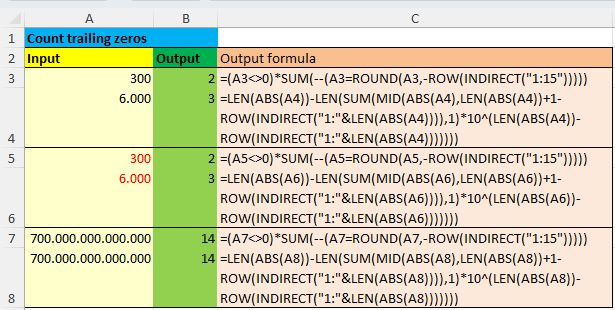
The formula in B4 would have been my favourite one if Excel had a worksheet function REVERSE. Then we could just use
=LEN(ABS(A1))-LEN(--REVERSE(ABS(A1)))
Download
Please read my Disclaimer.
Count_Trailing_Zeros_Region_UK.xlsm [34 KB Excel file, open and use at your own risk]
Note: A comprehensive documentation of my Excel implementations can be found in Excel VBA A Collection.