“Efficiency is doing things right; effectiveness is doing the right things.” [Peter Drucker]
Abstract
This way you can create emails with Excel / VBA:
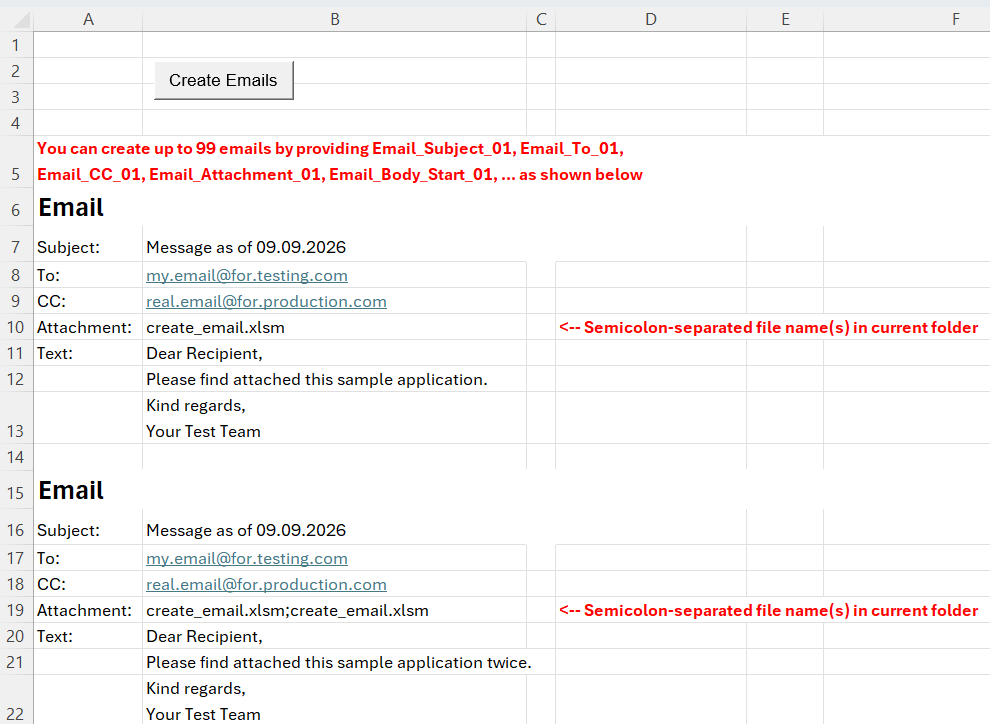
Prerequisite is a properly installed Microsoft Outlook.
Appendix – Create_Emails Program Code
I have also used this code in best practice excel vba.
Note: The sub Create_Emails requires the modules modLog/clsLog and the module (externer Link!) LibFileTools.
Please read my Disclaimer.
Option Explicit

#Const USE_LOGGER = 1 '1 = use it; 0 = do not

Sub Create_Emails()
'Create emails via MS Outlook.
'Version When         Who             What
'      1 08-Sep-2025  Bernd Plumhoff  Initial version

  Dim dtReportDate    As Date
  Dim i               As Long
  Dim j               As Long
  Dim r               As Range
  Dim s               As String
  Dim si              As String
  Dim v               As Variant
  Dim vAttachment     As Variant
  'Requires reference Microsoft Outlook v16.0 Object Library:
  Dim ool             As Outlook.Application
  Dim oMail           As Outlook.MailItem
#If USE_LOGGER Then
  Dim Logger          As clsLog

  Call Start_Log 'Only necessary ONCE on topmost calling level
  Set Logger = New clsLog
  Logger.Name = "Create_Email"
  Logger.LogLevel = g_log_params.log_level
#End If
  dtReportDate = Date
#If USE_LOGGER Then
  Logger.info "Report Date: " & Format(dtReportDate, "dd.mm.yyyy")
#End If
  Call Ensure_App_Folders
  wsSE.Calculate

  Set ool = CreateObject("Outlook.Application")

  i = 1
  si = Format(i, "00")
  On Error GoTo err_hdl
  Do While True 'Exit is via Err.Number 1004, when range does not exist
    Set r = Range("Email_Body_Start_" & si)
    s = r & vbCrLf
    Do While r.Value <> ""
      Set r = r.Offset(1, 0)
      s = s & vbCrLf & r
    Loop
    Set oMail = ool.CreateItem(olMailItem)
    With oMail
      .To = Range("Email_To_" & si)
      .CC = Range("Email_CC_" & si)
      .BCC = ""
      .Subject = Range("Email_Subject_" & si)
      .Body = s
      If Range("Email_Attachment_" & si) <> "" Then
        For Each v In Split(Range("Email_Attachment_" & si), ";")
          .Attachments.Add sAppFolder & v
        Next v
      End If
      .Display
    End With
    i = i + 1
    si = Format(i, "00")
  Loop
exit_sub:
#If USE_LOGGER Then
  Logger.info "Emails generated"
#End If
  Set ool = Nothing
  Set oMail = Nothing
  End_Log
  Exit Sub
err_hdl:
  Select Case err.Number
  Case -2147024894 'Typo in email attachment string. File does not exist
#If USE_LOGGER Then
    lWarn = lWarn + 1
    Logger.fatal "File '" & sAppFolder & _
      Range("Email_Attachment_" & si) & "' does not exist"
#End If
    Call MsgBox("File '" & sAppFolder & Range("Email_Attachment_" & si) & _
      "' does not exist", vbOKOnly, "Error")
    The_End
  Case 1004 'Range does not exist. Normal program end
    Resume exit_sub
  Case Else 'Other error. Die
    On Error GoTo 0
    Resume
  End Select
End Sub
Download
Please read my Disclaimer.
create_email.xlsm [227 KB Excel Datei, Download und Nutzung auf eigene Gefahr]
Note: A comprehensive documentation of my Excel implementations can be found in Excel VBA A Collection.