Abstract
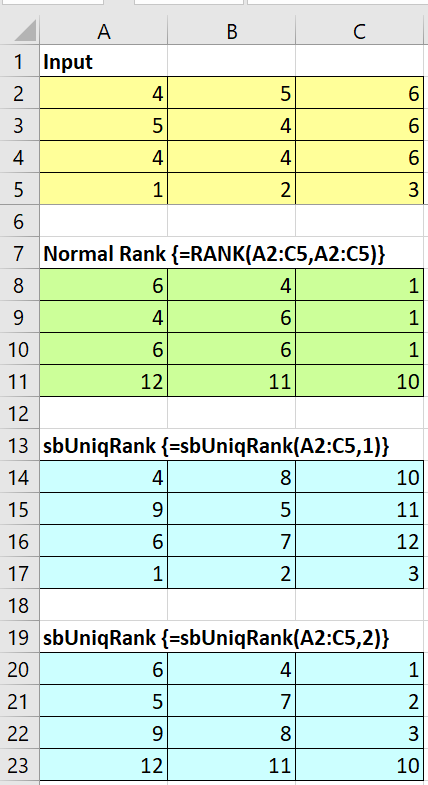
You need a rank function which returns a unique rank, even if duplicates occur? One possible approach:
You need to press ALT + F11, insert a new module and copy the program code below into the new module, then return to your spreadsheet, select cells A12:C15 and enter =sbUniqRank(A2:C5) with CTRL + SHIFT + ENTER as an array formula.
Appendix – sbUniqRank Code
Please read my Disclaimer.
Option Explicit

Function sbUniqRank(r As Range, _
  Optional vCountFrom As Variant = 1, _
  Optional bJustNumeric As Boolean = True, _
  Optional lOrder As Long = 0) As Variant
'Source (DE): http://www.berndplumhoff.de/sbuniqrank_de/
'Source (EN): http://www.sulprobil.de/sbuniqrank_en/
'(C) (P) by Bernd Plumhoff 25-Oct-2018 PB V0.6
'Array function to rank a range with unique ranks.
'vCountFrom determines from where you count in case of duplicates:
'1 = first rows (1 to count), then columns (1 to count), i. e. top left to top right (tltr)
'2 = starting with top right to top left, then downwards (trtl)
'...
'8 = starting with bottom right to top right, then to the left (brtr)
'If bJustNumeric is True then Rank will be used to rank, if False then Countif will be used.
'lOrder is like Rank's order: 0 = Descending, 1 = Ascending
Dim obj As Object
Dim bSwap As Boolean
Dim i As Long, i1 As Long, i2 As Long, i3 As Long
Dim j As Long, j1 As Long, j2 As Long, j3 As Long
Dim sComp As String
Dim vI As Variant, vR As Variant
vI = r: vR = vI
Set obj = CreateObject("Scripting.Dictionary")
Select Case vCountFrom
  Case 1, "tltr", "olor"
    i1 = 1: i2 = UBound(vI, 1): i3 = 1: j1 = 1: j2 = UBound(vI, 2): j3 = 1: bSwap = False
  Case 2, "trtl", "orol"
    i1 = 1: i2 = UBound(vI, 1): i3 = 1: j1 = UBound(vI, 2): j2 = 1: j3 = -1: bSwap = False
  Case 3, "blbr", "ulur"
    i1 = UBound(vI, 1): i2 = 1: i3 = -1: j1 = 1: j2 = UBound(vI, 2): j3 = 1: bSwap = False
  Case 4, "brbl", "urul"
    i1 = UBound(vI, 1): i2 = 1: i3 = -1: j1 = UBound(vI, 2): j2 = 1: j3 = -1: bSwap = False
  Case 5, "tlbl", "olul"
    i1 = 1: i2 = UBound(vI, 2): i3 = 1: j1 = 1: j2 = UBound(vI, 1): j3 = 1: bSwap = True
  Case 6, "bltl", "ulol"
    i1 = 1: i2 = UBound(vI, 2): i3 = 1: j1 = UBound(vI, 1): j2 = 1: j3 = -1: bSwap = True
  Case 7, "trbr", "orur"
    i1 = UBound(vI, 2): i2 = 1: i3 = -1: j1 = 1: j2 = UBound(vI, 1): j3 = 1: bSwap = True
  Case 8, "brtr", "uror"
    i1 = UBound(vI, 2): i2 = 1: i3 = -1: j1 = UBound(vI, 1): j2 = 1: j3 = -1: bSwap = True
  Case Else
    sbUniqRank = CVErr(xlErrValue)
    Exit Function
End Select
sComp = ">": If lOrder = 1 Then sComp = "<"
If bSwap Then
  'column - wise
  For i = i1 To i2 Step i3
    For j = j1 To j2 Step j3
      If bJustNumeric Then
        vR(j, i) = Application.WorksheetFunction.Rank(vI(j, i), r, lOrder) _
                   + obj.Item(vI(j, i))
      Else
        vR(j, i) = Application.WorksheetFunction.CountIf(r, _
                   sComp & vI(j, i)) + obj.Item(vI(j, i)) + 1
      End If
      obj.Item(vI(j, i)) = obj.Item(vI(j, i)) + 1
    Next j
  Next i
Else
  'row - wise
  For i = i1 To i2 Step i3
    For j = j1 To j2 Step j3
      If bJustNumeric Then
        vR(i, j) = Application.WorksheetFunction.Rank(vI(i, j), r, lOrder) _
                   + obj.Item(vI(i, j))
      Else
        vR(i, j) = Application.WorksheetFunction.CountIf(r, _
                   sComp & vI(i, j)) + obj.Item(vI(i, j)) + 1
      End If
      obj.Item(vI(i, j)) = obj.Item(vI(i, j)) + 1
    Next j
  Next i
End If
sbUniqRank = vR
End Function
Download
Please read my Disclaimer.
sbUniqRank.xlsm [22 KB Excel file, open and use at your own risk]
Note: A comprehensive documentation of my Excel implementations can be found in Excel VBA A Collection.