Abstract
You need to smoothen inner-period values, keeping the book-end values and the overall (total) average?
Two simple approaches:
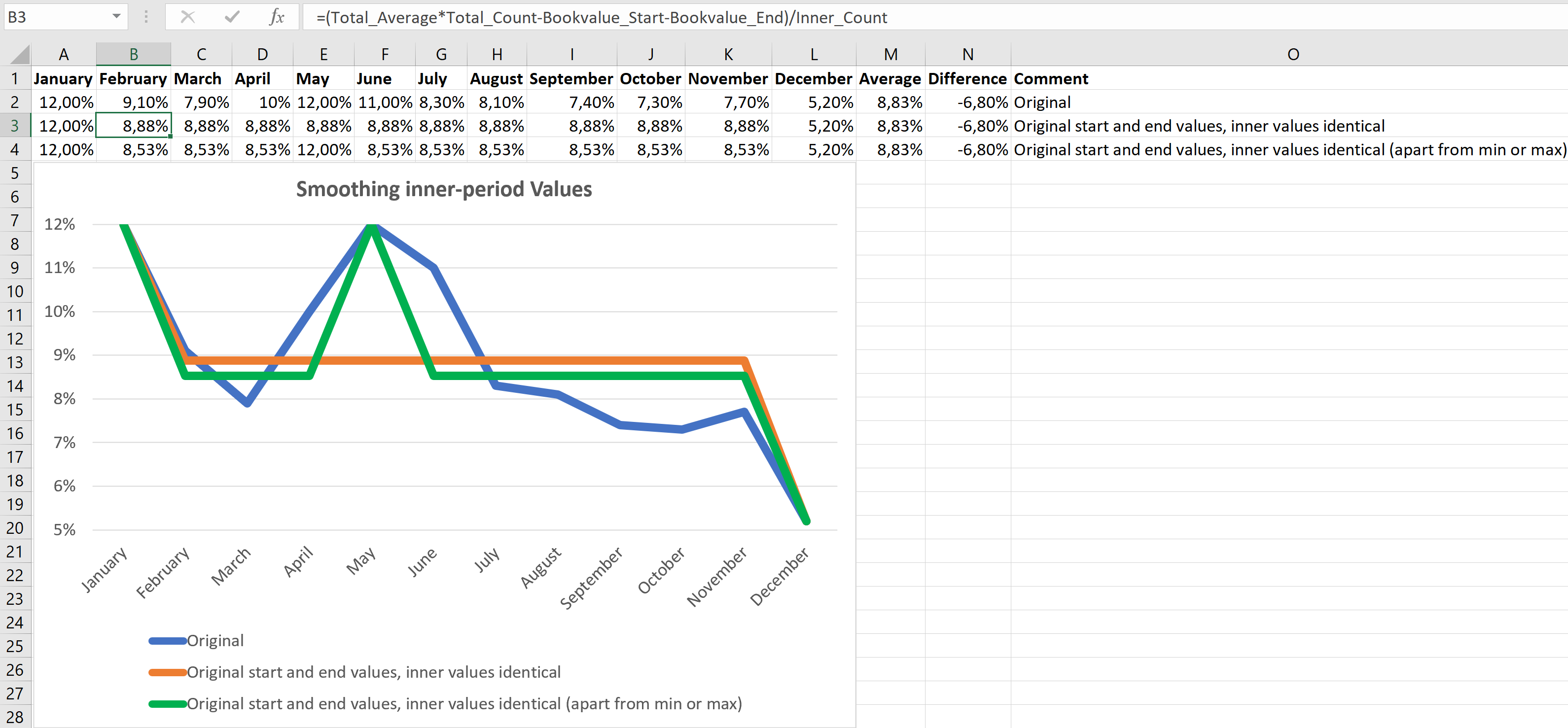
Define these names:
| Name | Refers to |
|---|---|
| All_Values | =Sheet1!$A$2:$K$2 |
| Bookvalue_End | =Sheet1!$L$2 |
| Bookvalue_Start | =Sheet1!$A$2 |
| Inner_Count | =(Total_Count-2) |
| Inner_Values | =Sheet1!$B$2:$K$2 |
| Total_Average | =AVERAGE(All_Values) |
| Total_Count | =COLUMN(Bookvalue_End)-COLUMN(Bookvalue_Start)+1 |
If all inner values should be identical, enter into
A3: =Bookvalue_Start
B3: =(@Total_Average*@Total_Count-Bookvalue_Start-Bookvalue_End)/@Inner_Count and copy to the right until cell K3
L3: =Bookvalue_End
If all inner values (with the exception of one or more most extreme values) should be identical, enter into
A3: =Bookvalue_Start
B3: =IF(ABS(@Total_Average-MAX(Inner_Values))>=ABS(@Total_Average-MIN(Inner_Values)),IF(B$2=MAX(Inner_Values),B$2,(@Total_Average*@Total_Count-Bookvalue_Start-Bookvalue_End-MAX(Inner_Values)*COUNTIF(Inner_Values,MAX(Inner_Values)))/(@Inner_Count-COUNTIF(Inner_Values,MAX(Inner_Values)))),IF(B$2=MIN(Inner_Values),B$2,(@Total_Average*@Total_Count-Bookvalue_Start-Bookvalue_End-MIN(Inner_Values)*COUNTIF(Inner_Values,MIN(Inner_Values)))/(@Inner_Count-COUNTIF(Inner_Values,MIN(Inner_Values))))) and copy to the right until cell K3
L3: =Bookvalue_End
Download
Please read my Disclaimer.
smoothing_inner_period_values.xlsx [17 KB Excel file, open and use at your own risk]
Note: A comprehensive documentation of my Excel implementations can be found in Excel VBA A Collection.