Abstract
You work in a fairly complex environment? Where you need read and write access rights to dozens of folders? You need to request this access from your IT department and and then you want to check whether you already got the requested access?
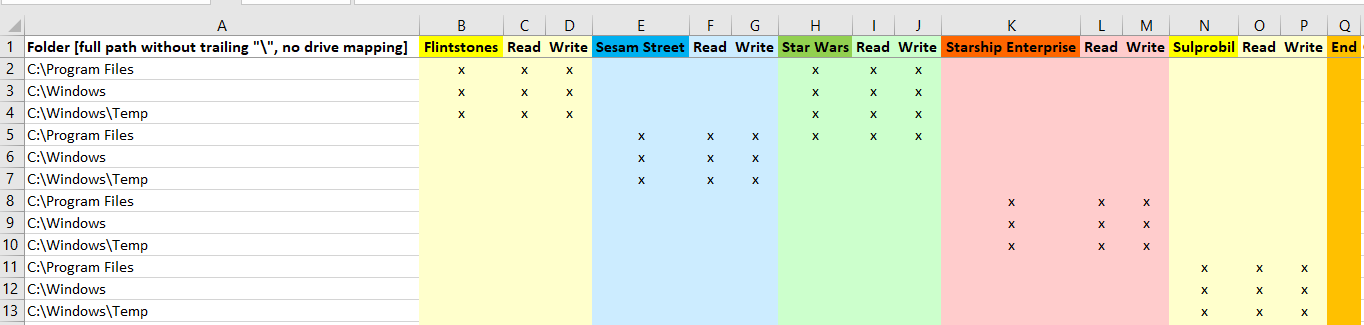
Then this program will hopefully be of help. First you define all necessary read/write access rights, maybe even for different teams:
Then run this app:
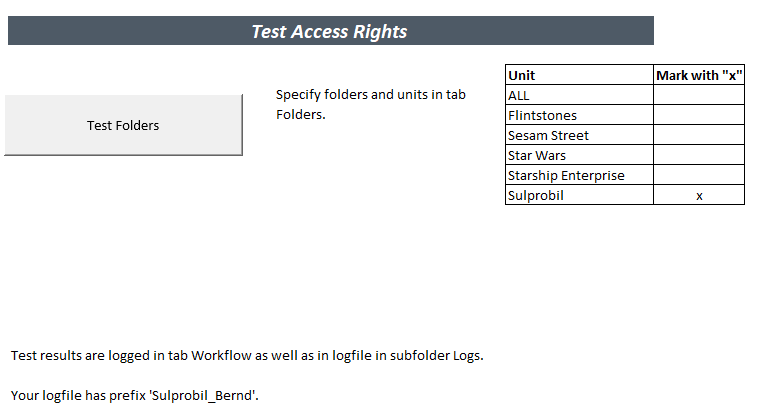
Now you can see which access you have got:
EVER: BERND-CAPTIVA\earso 02.04.2026 14:12:52 [Start_Log] - >>>>>>>>>>>>>>>>>>>>>>>>>>>>>>>>>>>>>>>>>>>>>>>>>>>>>>>>>>>>>>>>>>>>>>>>>>>>>>>>>>>>>>>>>>>>>>>>>>>>>>>>>>>>>>>>>>>>>>>>>>>>>>>>>>>>>>>>>>>>>>>>>>>>>>>>>>>>>>>>>>>>>>>>>>>>>>>>>>>>
EVER: BERND-CAPTIVA\earso 02.04.2026 14:12:52 [Start_Log] - Logging started with Test_Access_Rights_Version_26
EVER: BERND-CAPTIVA\earso 02.04.2026 14:12:52 [Start_Log] - SystemName='BERND-CAPTIVA'
EVER: BERND-CAPTIVA\earso 02.04.2026 14:12:54 [Start_Log] - Processor: AddressWidth=64, CurrentClockSpeed=2.592, DataWidth=64, Description='Intel64 Family 6 Model 167 Stepping 1', LoadPercentage=14, Name='11th Gen Intel(R) Core(TM) i5-11400 @ 2.60GHz', NumberOfEnabledCore=6
EVER: BERND-CAPTIVA\earso 02.04.2026 14:12:54 [Start_Log] - PhysicalMemoryArray: MaxCapacityEx=67.108.864
EVER: BERND-CAPTIVA\earso 02.04.2026 14:12:54 [Start_Log] - LogicalDisk: DeviceID='C:', FreeSpace=357.837.783.040, Size=478.931.841.024
EVER: BERND-CAPTIVA\earso 02.04.2026 14:12:54 [Start_Log] - LogicalDisk: DeviceID='E:'
EVER: BERND-CAPTIVA\earso 02.04.2026 14:12:54 [Start_Log] - LogicalDisk: DeviceID='F:'
EVER: BERND-CAPTIVA\earso 02.04.2026 14:12:54 [Start_Log] - OperatingSystem: FreePhysicalMemory=7.551.720, FreeSpaceInPagingFiles=2.425.920, FreeVirtualMemory=7.971.368, InstallDate=20211227172418.000000+060, MaxProcessMemorySize=137.438.953.344
EVER: BERND-CAPTIVA\earso 02.04.2026 14:12:54 [Start_Log] - Microsoft Windows 11 Home 10.0.22000 (64-Bit) and Excel 2024 (64-Bit)
INFO: BERND-CAPTIVA\earso 02.04.2026 14:12:54 [Start_Log] - Application ThousandsSeparator '.', DecimalSeparator ',', use system separators
INFO: BERND-CAPTIVA\earso 02.04.2026 14:12:54 [Start_Log] - App.Internl ThousandsSeparator '.', DecimalSeparator ',', ListSeparator ';'
INFO: BERND-CAPTIVA\earso 02.04.2026 14:12:54 [Start_Log] - App.Internl xlCountryCode '49', xlCountrySetting '49'
INFO: BERND-CAPTIVA\earso 02.04.2026 14:12:54 [Start_Log] - VBAProject References:
INFO: BERND-CAPTIVA\earso 02.04.2026 14:12:54 [Start_Log] - Visual Basic For Applications, FullPath: 'C:\Program Files\Common Files\Microsoft Shared\VBA\VBA7.1\VBE7.DLL', Guid: {000204EF-0000-0000-C000-000000000046}, BuiltIn: Wahr, IsBroken: Falsch, Major: 4, Minor: 2
INFO: BERND-CAPTIVA\earso 02.04.2026 14:12:54 [Start_Log] - Microsoft Excel 16.0 Object Library, FullPath: 'C:\Program Files\Microsoft Office\root\Office16\EXCEL.EXE', Guid: {00020813-0000-0000-C000-000000000046}, BuiltIn: Wahr, IsBroken: Falsch, Major: 1, Minor: 9
INFO: BERND-CAPTIVA\earso 02.04.2026 14:12:54 [Start_Log] - OLE Automation, FullPath: 'C:\Windows\System32\stdole2.tlb', Guid: {00020430-0000-0000-C000-000000000046}, BuiltIn: Falsch, IsBroken: Falsch, Major: 2, Minor: 0
INFO: BERND-CAPTIVA\earso 02.04.2026 14:12:54 [Start_Log] - Microsoft Office 16.0 Object Library, FullPath: 'C:\Program Files\Common Files\Microsoft Shared\OFFICE16\MSO.DLL', Guid: {2DF8D04C-5BFA-101B-BDE5-00AA0044DE52}, BuiltIn: Falsch, IsBroken: Falsch, Major: 2, Minor: 8
INFO: BERND-CAPTIVA\earso 02.04.2026 14:12:54 [TestFolders] - Testing access to folders now
INFO: BERND-CAPTIVA\earso 02.04.2026 14:12:54 [TestFolders] - Unit Sulprobil has value 'x'
INFO: BERND-CAPTIVA\earso 02.04.2026 14:12:54 [TestFolders] - Can access (read) folder 'C:\Program Files'
##FATAL: BERND-CAPTIVA\earso 02.04.2026 14:12:54 [TestFolders] - Cannot access (write) folder 'C:\Program Files'
INFO: BERND-CAPTIVA\earso 02.04.2026 14:12:54 [TestFolders] - Can access (read) folder 'C:\Windows'
##FATAL: BERND-CAPTIVA\earso 02.04.2026 14:12:54 [TestFolders] - Cannot access (write) folder 'C:\Windows'
INFO: BERND-CAPTIVA\earso 02.04.2026 14:12:54 [TestFolders] - Can access (read) folder 'C:\Windows\Temp'
INFO: BERND-CAPTIVA\earso 02.04.2026 14:12:54 [TestFolders] - Can access (write) folder 'C:\Windows\Temp'
INFO: BERND-CAPTIVA\earso 02.04.2026 14:12:54 [TestFolders] - Testing access to folders finished
EVER: BERND-CAPTIVA\earso 02.04.2026 14:12:54 [End_Log] - Logging finished with Test_Access_Rights_Version_26
EVER: BERND-CAPTIVA\earso 02.04.2026 14:12:54 [End_Log] - <<<<<<<<<<<<<<<<<<<<<<<<<<<<<<<<<<<<<<<<<<<<<<<<<<<<<<<<<<<<<<<<<<<<<<<<<<<<<<<<<<<<<<<<<<<<<<<<<<<<<<<<<<<<<<<<<<<<<<<<<<<<<<<<<<<<<<<<<<<<<<<<<<<<<<<<<<<<<<<<<<<<<<<<<<<<<<<<<<<<<<
Appendix – Test_Access_Rights Code
Please note: this program needs (uses) the classes SystemState and clsLog.
Please read my Disclaimer.
Option Explicit

Public Const AppVersion As String = "Test_Access_Rights_Version_26" 'Each log will show which version it has been created with

Sub TestFolders()
'Test folder access.
'(C) (P) by Bernd Plumhoff  02-Apr-2026 PB v26

Dim bRead        As Boolean
Dim bWrite       As Boolean
Dim fileNumber   As Integer
Dim status       As Integer
Dim i            As Long
Dim j            As Long
Dim s            As String
Dim sTry         As String
Dim state        As SystemState
Dim httpRequest  As Object
Dim oUnit        As Object
Dim v            As Variant
Dim GLogger      As clsLog

Start_Log 'Only necessary ONCE on topmost calling depth
Set GLogger = New clsLog
g_log_params.log_sub_name = "TestFolders"
Set state = New SystemState
GLogger.info "Testing access to folders now"
Main.Calculate
Set oUnit = CreateObject("Scripting.Dictionary")
For Each v In Range("Units_Selected")
    s = Main.Range(v.Address).Offset(0, 1).Text
    oUnit(CStr(v)) = s
    If s = "x" Then GLogger.info "Unit " & v & " has value 'x'"
Next v
On Error GoTo ErrHdl
i = 2
s = DecodeURL(Replace(wsF.Cells(i, 1), "[Username]", Environ("Username")))
Do While s <> ""
    bRead = False: bWrite = False
    If oUnit("ALL") = "x" Then
        bRead = True
        bWrite = True
    Else
        j = 2
        Do While wsF.Cells(1, j) <> "End"
            If oUnit(wsF.Cells(1, j).Text) = "x" Then
                If wsF.Cells(i, j) = "x" Then
                    If wsF.Cells(i, j + 1) = "x" Then bRead = True
                    If wsF.Cells(i, j + 2) = "x" Then bWrite = True
                End If
            End If
            j = j + 3
        Loop
    End If
    If bRead Then
        Application.StatusBar = "Testing " & s
        sTry = "read"
        If LCase(Left(s, 8)) = "https://" Then
            Set httpRequest = CreateObject("MSXML2.XMLHTTP")
            httpRequest.Open "GET", s, False
            httpRequest.Send
            status = httpRequest.status
            If status = 200 Then
                GLogger.info "Can access (" & sTry & ") folder '" & s & "'"
            Else
                GLogger.fatal "Cannot access (" & sTry & ") folder '" & s & "'" & _
                    IIf(sTry = "read" And bWrite, " - write access expected", "") & _
                    " - Status code: " & status
            End If
        Else
            ChDir (s)
            GLogger.info "Can access (" & sTry & ") folder '" & s & "'"
        End If
    End If
    If bWrite And LCase(Left(s, 8)) <> "https://" Then 'Cannot test write access to SPO yet
        Application.StatusBar = "Testing " & s
        sTry = "write"
        If IsFolderEditable(s) Then
            GLogger.info "Can access (" & sTry & ") folder '" & s & "'"
        Else
            GLogger.fatal "Cannot access (" & sTry & ") folder '" & s & "'" & _
                IIf(sTry = "read" And bWrite, " - write access expected", "")
        End If
    End If
LabelNext:
    i = i + 1
    s = DecodeURL(Replace(wsF.Cells(i, 1), "[Username]", Environ("Username")))
Loop

GLogger.info "Testing access to folders finished"
End_Log
Exit Sub

ErrHdl:
Select Case err.Number
Case 52
    'Dir(s, vbDirectory) went wrong
    GLogger.fatal "Cannot access (" & sTry & ") folder '" & s & "'" & _
        IIf(sTry = "read" And bWrite, " - write access expected", "")
    Resume LabelNext 'Back to next row
Case 75, 76
    'ChDir (s) was not possible
    GLogger.fatal "Cannot access (" & sTry & ") folder '" & s & "'" & _
        IIf(sTry = "read" And bWrite, " - write access expected", "")
    Resume LabelNext 'Back to next row
Case Else
    GLogger.fatal "Cannot access (" & sTry & ") folder '" & s & _
        "'. Error number: " & err.Number & _
        IIf(sTry = "read" And bWrite, " - write access expected", "")
    Resume LabelNext 'Back to next row
End Select

End Sub
Download
Please read my Disclaimer.
Test_Access_Rights.xlsm [225 KB Excel file, open and use at your own risk]
Note: A comprehensive documentation of my Excel implementations can be found in Excel VBA A Collection.