Abstract
How can I ensure that an Excel date formula is correct?
I need to test it!
This works best:
- I generate all days of the relevant date range in column A. 1-Jan-1901 to 31-Dec-2099, for example.
- I enter all possible formulas in columns B, C, D, … and copy down.
- I compare all results to the reference formula in column B.
Example
How many ISO calendar weeks does a given month touch?
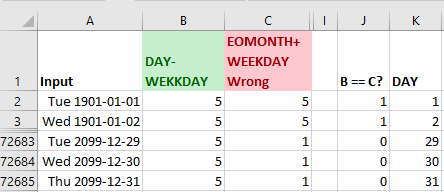
The formulas:
| B | C | J | K | |
|---|---|---|---|---|
| 1 | DAY-WEEKDAY | EOMONTH+WEEKDAY Falsch | B == C? | DAY |
| 2 | =QUOTIENT(DAY(EOMONTH(A2,0))+13-WEEKDAY(EOMONTH(A2,0),2),7) | =QUOTIENT((EOMONTH(A2,0)-A2+6+WEKKDAY(A2,2)),7) | =–($B2=C2) | =DAY(A2) |
Copy row 2 down.
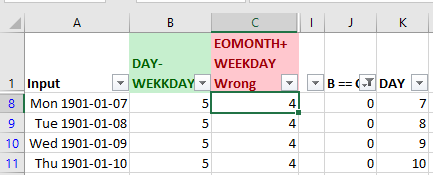
If you set a filter on row 1 and if you filter for 0 in column J you can quickly see where column C differs from reference column B:
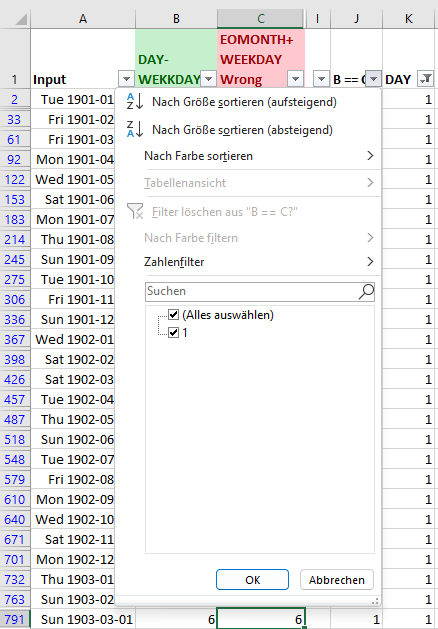
If you filter column K for day 1 (start of each month) then you can see that formulas in column C are correct for the first day of each month (but unfortunately just for those):
Download
Please read my Disclaimer.
test_date_formulas.xlsx [11 KB Excel file, open and use at your own risk]
Note: A comprehensive documentation of my Excel implementations can be found in Excel VBA A Collection.