“It is practically impossible to teach good programming style to students that have had prior exposure to BASIC. As potential programmers, they are mentally mutilated beyond hope of regeneration.” [E. W. Dijkstra]
Abstract
The application below is meant to help people who want to test properly.
You want to create six Boolean values, 50% True and 50% False, once in generated order and once shuffled? Here you are:

Or you need to create 4 money values in GBP, the first series between GBP 10 and GBP 20, the second should have an average of 6 and a standard deviation of 2?
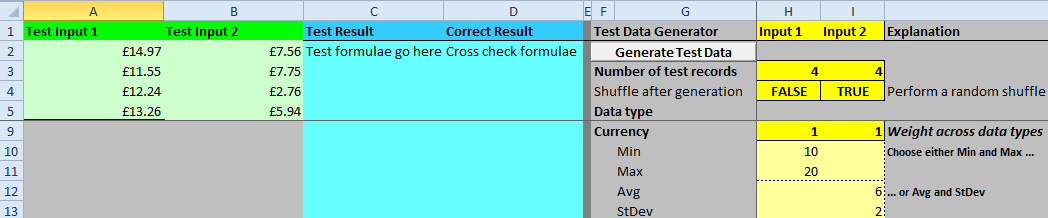
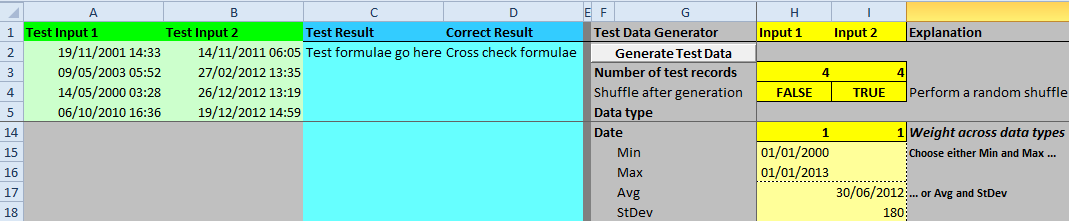
If you like to generate four dates between 1-Jan-2000 and 1-Jan-2013 or four dates with average 30-Jun-2012 and with a standard deviation of 180 (days):
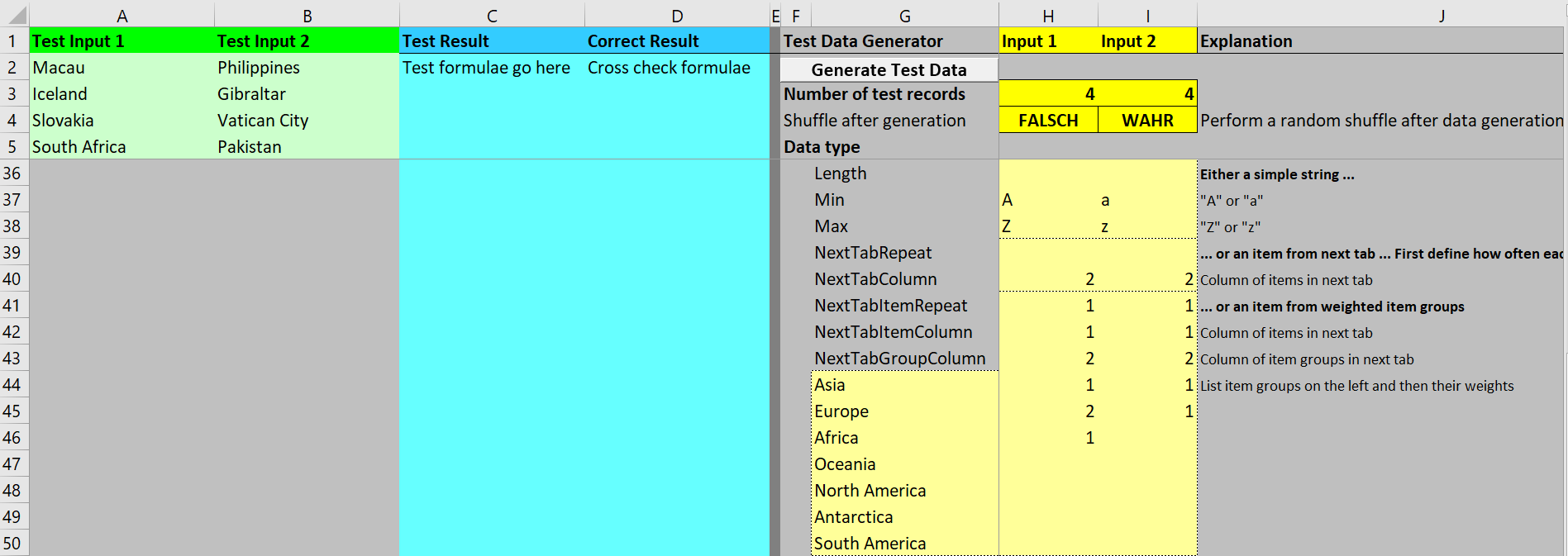
If you need 4 countries, one African, one Asian and two European; or you need 2 Asian and 2 European (drag tab “Countries” next right to tab “Data” so that it is tab #2!):
If you like to generate first names from a list, drag tab “First_Names” next right to tab “Data”, you get a warning, just press “Ok”:
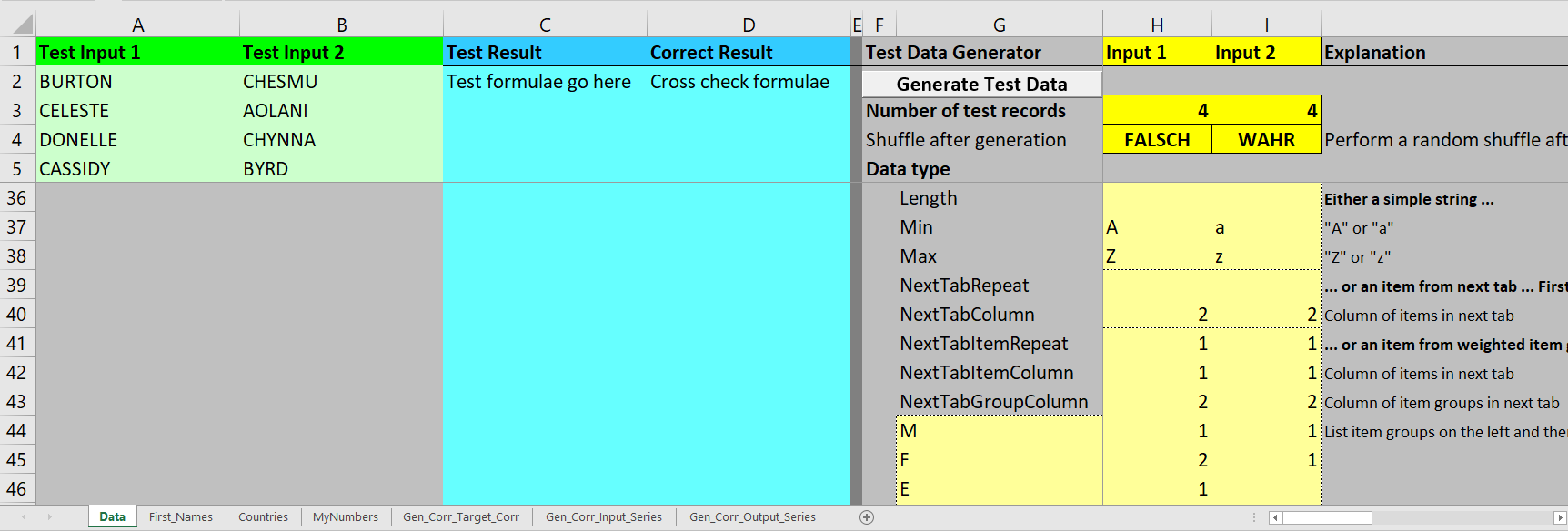
Note: It is not pure chance that columns of items and item groups in both tabs are identical here. Actually, I have created it this way, so that I can easily switch between creating first names or country names.
You can also generate correlated numbers with this application. I have implemented the Iman Conover method with VBA.
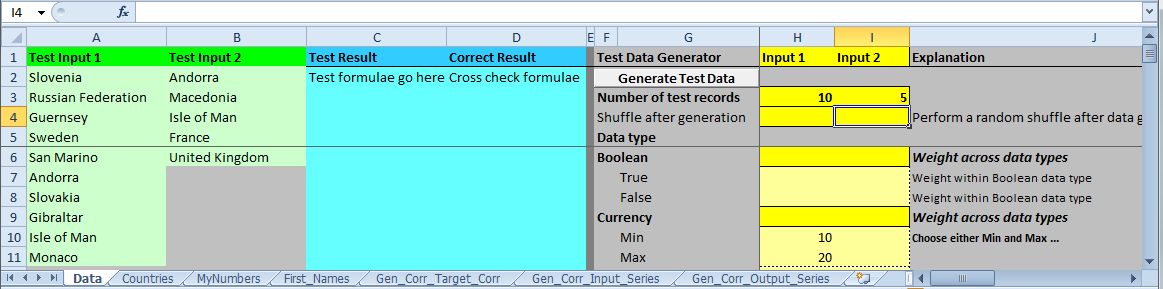
The spreadsheet tabs:
Appendix – sbGenerateTestData Code
Please notice that this application requires (calls) the user-defined functions Cholesky, RoundToSum, sbExactRandHistogrm, sbLongRandSumN, sbRandHistogrm, sbRandInt and UniqRandInt.
Please read my Disclaimer.
Enum types
  ty_start = 0 'So that we can iterate from ty_start + 1 to ty_end - 1
  ty_boolean
  ty_currency
  ty_date
  ty_decimal
  ty_double
  ty_long
  ty_string
  ty_end  'So that we can iterate from ty_start + 1 to ty_end - 1
End Enum 'types

Enum param_rows
  pr_records = 3
  pr_shuffle
  pr_Boolean = 6
    pr_bTrue
    pr_bFalse
  pr_Currency
    pr_ccyMin
    pr_ccyMax
    pr_ccyAvg
    pr_ccyStDev
  pr_Date
    pr_dtMin
    pr_dtMax
    pr_dtAvg
    pr_dtStDev
  pr_Decimal
    pr_decMin
    pr_decMax
    pr_decAvg
    pr_decStDev
  pr_Double
    pr_dMin
    pr_dMax
    pr_dAvg
    pr_dStDev
  pr_Long
    pr_lSum
    pr_lMin1
    pr_lMin2
    pr_lMax
    pr_lMaxRepeat
  pr_String
    pr_sLength
    pr_sMin
    pr_sMax
    pr_sNextTabRepeat
    pr_sNextTabColumn
    pr_sNextTabItemRepeat
    pr_sNextTabItemColumn
    pr_sNextTabGroupColumn
    pr_sNextTabGroupWeights 'Item group weights start from here and can go down any number
End Enum 'param_rows

Enum param_columns
  pc_Output1 = 1
  pc_Output2
  pc_ItemGroups = 7
  pc_Input1 = 8
  pc_Input2
End Enum 'param_columns

Private Enum xlCI 'Excel Color Index
: xlCIBlack = 1: xlCIWhite: xlCIRed: xlCIBrightGreen: xlCIBlue '1 - 5
: xlCIYellow: xlCIPink: xlCITurquoise: xlCIDarkRed: xlCIGreen '6 - 10
: xlCIDarkBlue: xlCIDarkYellow: xlCIViolet: xlCITeal: xlCIGray25 '11 - 15
: xlCIGray50: xlCIPeriwinkle: xlCIPlum: xlCIIvory: xlCILightTurquoise '16 - 20
: xlCIDarkPurple: xlCICoral: xlCIOceanBlue: xlCIIceBlue: xlCILightBrown '21 - 25
: xlCIMagenta2: xlCIYellow2: xlCICyan2: xlCIDarkPink: xlCIDarkBrown '26 - 30
: xlCIDarkTurquoise: xlCISeaBlue: xlCISkyBlue: xlCILightTurquoise2: xlCILightGreen '31 - 35
: xlCILightYellow: xlCIPaleBlue: xlCIRose: xlCILavender: xlCITan '36 - 40
: xlCILightBlue: xlCIAqua: xlCILime: xlCIGold: xlCILightOrange '41 - 45
: xlCIOrange: xlCIBlueGray: xlCIGray40: xlCIDarkTeal: xlCISeaGreen '46 - 50
: xlCIDarkGreen: xlCIGreenBrown: xlCIBrown: xlCIDarkPink2: xlCIIndigo '51 - 55
: xlCIGray80 '56
End Enum

Sub sbGenerateTestData()
'Randomly generate test data as specified in input area.
'Source (EN): https://www.sulprobil.de/sbgeneratetestdata_en/
'Source (DE): https://www.berndplumhoff.de/sbgeneratetestdata_de/
'Bernd Plumhoff 06-Apr-2021 PB V0.2

Dim bGroupsUpToDate As Boolean
Dim dAvg As Double
Dim dmax As Double
Dim dmin As Double
Dim dStDev As Double
Dim dSumWeights As Double
ReDim dTypeWeight(ty_start + 1 To ty_end - 1) As Double
ReDim sTypeName(ty_start + 1 To ty_end - 1) As String
Dim i As Long
Dim j As Long
Dim k As Long
Dim lCol As Long
Dim lLength As Long
Dim lRecord As Long
Dim lRow As Long
Dim lIdx As Long
Dim lTypeSum As Long
Dim objItem As Object
Dim objGroup As Object
Dim s As String
Dim sErrMsg As String
Dim v As Variant
Dim vThisType As Variant
Dim vType As Variant
Dim vGroup As Variant
Dim wsItem As Worksheet
Dim state As SystemState

Set state = New SystemState
Randomize

With Application.WorksheetFunction

'Clear input
wsD.Range("A:A").Offset(, pc_Output1 - 1).ClearContents
wsD.Range("A:A").Offset(, pc_Output2 - 1).ClearContents
wsD.Range("A:A").Offset(, pc_Output1 - 1).ClearFormats
wsD.Range("A:A").Offset(, pc_Output2 - 1).ClearFormats
wsD.Range("A:A").Offset(, pc_Output1 - 1).Interior.ColorIndex = xlCIGray25
wsD.Range("A:A").Offset(, pc_Output2 - 1).Interior.ColorIndex = xlCIGray25
With wsD.Range("A1").Offset(, pc_Output1 - 1)
  .Formula = "Test Input 1"
  .Font.Bold = True
  .Interior.ColorIndex = xlCIBrightGreen
End With
With wsD.Range("A1").Offset(, pc_Output2 - 1)
  .Formula = "Test Input 2"
  .Font.Bold = True
  .Interior.ColorIndex = xlCIBrightGreen
End With

sTypeName(ty_boolean) = "Boolean"
sTypeName(ty_currency) = "Currency"
sTypeName(ty_date) = "Date"
sTypeName(ty_decimal) = "Decimal"
sTypeName(ty_double) = "Double"
sTypeName(ty_long) = "Long"
sTypeName(ty_string) = "String"

For lCol = pc_Input1 To pc_Input2
  sErrMsg = ""
  lRecord = wsD.Cells(pr_records, lCol)
  If lRecord <= 0 Then
    Call MsgBox("Number of test records must be greater zero!" & vbCrLf, vbOKOnly, "Error")
    Exit Sub
  End If
  wsD.Cells(2, lCol - pc_Input1 + pc_Output1).Resize(lRecord).Interior.ColorIndex = xlCILightGreen
  ReDim vInput(1 To lRecord) As Variant
  lIdx = 1
  dTypeWeight(ty_boolean) = wsD.Cells(pr_Boolean, lCol)
  dTypeWeight(ty_currency) = wsD.Cells(pr_Currency, lCol)
  dTypeWeight(ty_date) = wsD.Cells(pr_Date, lCol)
  dTypeWeight(ty_decimal) = wsD.Cells(pr_Decimal, lCol)
  dTypeWeight(ty_double) = wsD.Cells(pr_Double, lCol)
  dTypeWeight(ty_long) = wsD.Cells(pr_Long, lCol)
  dTypeWeight(ty_string) = wsD.Cells(pr_String, lCol)
  dSumWeights = 0#
  For i = LBound(dTypeWeight) To UBound(dTypeWeight)
    If dTypeWeight(i) < 0 Then sErrMsg = sErrMsg & _
      "Weight for data type " & sTypeName(i) & " must be greater equal zero!" & vbCrLf
    dSumWeights = dSumWeights + dTypeWeight(i)
  Next i
  If dSumWeights <= 0 Then sErrMsg = sErrMsg & _
    "Sum of weights for data types (Boolean, ..., String) must be greater zero!" & vbCrLf

  If Len(sErrMsg) > 0 Then
    Call MsgBox(sErrMsg & vbCrLf, vbOKOnly, "Error")
    Exit Sub
  End If
  For i = LBound(dTypeWeight) To UBound(dTypeWeight)
    dTypeWeight(i) = dTypeWeight(i) / dSumWeights * lRecord
  Next i
  'Decide how many records to generate for each data type
  vType = RoundToSum(dTypeWeight, 0)

  For i = LBound(vType, 1) To UBound(vType, 1)
    If vType(i) > 0 Then
      Select Case i
      Case ty_boolean
        ReDim dThisTypeWeight(1 To 2) As Double
        If Abs(wsD.Cells(pr_bTrue, lCol) + wsD.Cells(pr_bFalse, lCol)) < 0.0000000000001 Then
          'No weights means equal weights
          dThisTypeWeight(1) = vType(i) / 2
          dThisTypeWeight(2) = dThisTypeWeight(1)
        Else
          dThisTypeWeight(1) = wsD.Cells(pr_bTrue, lCol) / _
                              (wsD.Cells(pr_bTrue, lCol) + _
                              wsD.Cells(pr_bFalse, lCol)) * _
                              vType(i)
          dThisTypeWeight(2) = wsD.Cells(pr_bFalse, lCol) / _
                              (wsD.Cells(pr_bFalse, lCol) + _
                              wsD.Cells(pr_bTrue, lCol)) * _
                              vType(i)
        End If
        vThisType = RoundToSum(dThisTypeWeight, 0)
        For j = 1 To vThisType(1)
          vInput(lIdx) = True
          lIdx = lIdx + 1
        Next j
        For j = 1 To vThisType(2)
          vInput(lIdx) = False
          lIdx = lIdx + 1
        Next j
      Case ty_currency
        If IsEmpty(wsD.Cells(pr_ccyAvg, lCol)) Or IsEmpty(wsD.Cells(pr_ccyStDev, lCol)) Then
          'Work with Min and Max
          dmin = wsD.Cells(pr_ccyMin, lCol)
          dmax = wsD.Cells(pr_ccyMax, lCol)
          For j = 1 To vType(i)
            vInput(lIdx) = CCur(dmin + Rnd() * (dmax - dmin))
            lIdx = lIdx + 1
          Next j
        Else
          'Work with Avg and StDev
          ReDim dThisDouble(1 To vType(i)) As Double
          For j = 1 To vType(i)
            dThisDouble(j) = Rnd()
          Next j
          dAvg = .Average(dThisDouble)
          dStDev = .StDevP(dThisDouble)
          If dStDev < 0.0000000000001 Then
            If vType(i) = 1 Then
              vInput(lIdx) = CCur(dAvg)
              lIdx = lIdx + 1
            Else
              Call MsgBox("StDev of data type " & sTypeName(ty_currency) & _
                  " must not be zero!", vbOKOnly, "Error!")
              Exit Sub
            End If
          End If
          For j = 1 To vType(i)
            vInput(lIdx) = CCur(wsD.Cells(pr_ccyAvg, lCol) + _
                           (dThisDouble(j) - dAvg) * _
                           wsD.Cells(pr_ccyStDev, lCol) / dStDev)
            lIdx = lIdx + 1
          Next j
        End If
      Case ty_date
        If IsEmpty(wsD.Cells(pr_dtAvg, lCol)) Or IsEmpty(wsD.Cells(pr_dtStDev, lCol)) Then
          'Work with Min and Max
          dmin = wsD.Cells(pr_dtMin, lCol)
          dmax = wsD.Cells(pr_dtMax, lCol)
          For j = 1 To vType(i)
            vInput(lIdx) = CDate(dmin + Rnd() * (dmax - dmin))
            lIdx = lIdx + 1
          Next j
        Else
          'Work with Avg and StDev
          ReDim dThisDouble(1 To vType(i)) As Double
          For j = 1 To vType(i)
            dThisDouble(j) = Rnd()
          Next j
          dAvg = .Average(dThisDouble)
          dStDev = .StDevP(dThisDouble)
          If dStDev < 0.0000000000001 Then
            If vType(i) = 1 Then
              vInput(lIdx) = CDate(dAvg)
              lIdx = lIdx + 1
            Else
              Call MsgBox("StDev of data type " & sTypeName(ty_date) & _
                   " must not be zero!", vbOKOnly, "Error!")
              Exit Sub
            End If
          End If
          For j = 1 To vType(i)
            vInput(lIdx) = CDate(wsD.Cells(pr_dtAvg, lCol) + _
                           (dThisDouble(j) - dAvg) * _
                           wsD.Cells(pr_dtStDev, lCol) / dStDev)
            lIdx = lIdx + 1
          Next j
        End If
      Case ty_decimal
        If IsEmpty(wsD.Cells(pr_decAvg, lCol)) Or IsEmpty(wsD.Cells(pr_decStDev, lCol)) Then
          'Work with Min and Max
          dmin = wsD.Cells(pr_decMin, lCol)
          dmax = wsD.Cells(pr_decMax, lCol)
          For j = 1 To vType(i)
            vInput(lIdx) = CDec(dmin + Rnd() * (dmax - dmin))
            lIdx = lIdx + 1
          Next j
        Else
          'Work with Avg and StDev
          ReDim dThisDouble(1 To vType(i)) As Double
          For j = 1 To vType(i)
            dThisDouble(j) = Rnd()
          Next j
          dAvg = .Average(dThisDouble)
          dStDev = .StDevP(dThisDouble)
          If dStDev < 0.0000000000001 Then
            If vType(i) = 1 Then
              vInput(lIdx) = CDec(dAvg)
              lIdx = lIdx + 1
            Else
              Call MsgBox("StDev of data type " & sTypeName(ty_decimal) & _
                   " must not be zero!", vbOKOnly, "Error!")
              Exit Sub
            End If
          End If
          For j = 1 To vType(i)
            vInput(lIdx) = CDec(wsD.Cells(pr_decAvg, lCol) + _
                           (dThisDouble(j) - dAvg) * _
                           wsD.Cells(pr_decStDev, lCol) / dStDev)
            lIdx = lIdx + 1
          Next j
        End If
      Case ty_double
        If IsEmpty(wsD.Cells(pr_dAvg, lCol)) Or IsEmpty(wsD.Cells(pr_dStDev, lCol)) Then
          'Work with Min and Max
          dmin = wsD.Cells(pr_dMin, lCol)
          dmax = wsD.Cells(pr_dMax, lCol)
          For j = 1 To vType(i)
            vInput(lIdx) = CDbl(dmin + Rnd() * (dmax - dmin))
            lIdx = lIdx + 1
          Next j
        Else
          'Work with Avg and StDev
          ReDim dThisDouble(1 To vType(i)) As Double
          For j = 1 To vType(i)
            dThisDouble(j) = Rnd()
          Next j
          dAvg = .Average(dThisDouble)
          dStDev = .StDevP(dThisDouble)
          If dStDev < 0.0000000000001 Then
            If vType(i) = 1 Then
              vInput(lIdx) = CDbl(dAvg)
              lIdx = lIdx + 1
            Else
              Call MsgBox("StDev of data type " & sTypeName(ty_double) & _
                   " must not be zero!", vbOKOnly, "Error!")
              Exit Sub
            End If
          End If
          For j = 1 To vType(i)
            vInput(lIdx) = CDbl(wsD.Cells(pr_dAvg, lCol) + _
                           (dThisDouble(j) - dAvg) * _
                           wsD.Cells(pr_dStDev, lCol) / dStDev)
            lIdx = lIdx + 1
          Next j
        End If
      Case ty_long
        If IsEmpty(wsD.Cells(pr_lSum, lCol)) Then
          If IsEmpty(wsD.Cells(pr_lMaxRepeat, lCol)) Then
            'Work with arbitrary repetitions
            dmin = wsD.Cells(pr_lMin2, lCol)
            dmax = wsD.Cells(pr_lMax, lCol)
            For j = 1 To vType(i)
              vInput(lIdx) = Int(dmin + Rnd() * (dmax - dmin + 1))
              lIdx = lIdx + 1
            Next j
          Else
            If (wsD.Cells(pr_lMax, lCol) - wsD.Cells(pr_lMin2, lCol) + 1) * _
              wsD.Cells(pr_lMaxRepeat, lCol) < vType(i) Then
              Call MsgBox("Not enough random numbers for data type " & sTypeName(ty_long) & _
                  "!", vbOKOnly, "Error!")
              Exit Sub
            End If
            v = sbRandInt(CLng(vType(i)), wsD.Cells(pr_lMin2, lCol), wsD.Cells(pr_lMax, lCol), _
                wsD.Cells(pr_lMaxRepeat, lCol))
            For j = 1 To vType(i)
              vInput(lIdx) = v(j)
              lIdx = lIdx + 1
            Next j
          End If
        Else
          v = sbLongRandSumN(wsD.Cells(pr_lSum, lCol), vType(i), _
              wsD.Cells(pr_lMin1, lCol))
          For j = 1 To vType(i)
            vInput(lIdx) = v(j)
            lIdx = lIdx + 1
          Next j
        End If
      Case ty_string
        If Not IsEmpty(wsD.Cells(pr_sLength, lCol)) Then
          'Simple string
          lLength = wsD.Cells(pr_sLength, lCol)
          If lLength <= 0 Then lLength = 1
          dmin = Asc(wsD.Cells(pr_sMin, lCol))
          dmax = Asc(wsD.Cells(pr_sMax, lCol))
          For j = 1 To vType(i)
            s = ""
            For k = 1 To lLength
              s = s & Chr(dmin + Rnd() * (dmax - dmin))
            Next k
            vInput(lIdx) = s
            lIdx = lIdx + 1
          Next j
        ElseIf Not IsEmpty(wsD.Cells(pr_sNextTabRepeat, lCol)) Then
          'Simple items from next tab
          Set wsItem = Sheets(2)
          If (wsItem.Cells(1, wsD.Cells(pr_sNextTabColumn, lCol)).End(xlDown).Row - 1) * _
            wsD.Cells(pr_sNextTabRepeat, lCol) < vType(i) Then
            Call MsgBox("Not enough random numbers for data type " & sTypeName(ty_string) & _
                 "!", vbOKOnly, "Error!")
            Exit Sub
          End If
          v = sbRandInt(CLng(vType(i)), 2, _
              wsItem.Cells(1, wsD.Cells(pr_sNextTabColumn, lCol)).End(xlDown).Row, _
              wsD.Cells(pr_sNextTabRepeat, lCol))
          For j = 1 To vType(i)
            vInput(lIdx) = wsItem.Cells(1, wsD.Cells(pr_sNextTabColumn, lCol))(v(j))
            lIdx = lIdx + 1
          Next j
        Else
          'Items from weighted groups from next tab
          Set wsItem = Sheets(2)
          Set objGroup = CreateObject("Scripting.Dictionary")
          j = 2
          Do While Not IsEmpty(wsItem.Cells(j, wsD.Cells(pr_sNextTabGroupColumn, lCol)))
            objGroup.Item(wsItem.Cells(j, wsD.Cells(pr_sNextTabGroupColumn, lCol)).Value) = _
                objGroup.Item(wsItem.Cells(j, wsD.Cells(pr_sNextTabGroupColumn, lCol)).Value) + 1
            j = j + 1
          Loop
          'Are the item groups still identical to the ones in the param list?
          bGroupsUpToDate = True
          j = 0
          Do While Not IsEmpty(wsD.Cells(pr_sNextTabGroupWeights + j, pc_ItemGroups))
            If objGroup.Item(wsD.Cells(pr_sNextTabGroupWeights + j, pc_ItemGroups).Value) > 0 Then
              objGroup.Item(wsD.Cells(pr_sNextTabGroupWeights + j, pc_ItemGroups).Value) = 0
            Else
              Set objGroup = Nothing
              Set objGroup = CreateObject("Scripting.Dictionary")
              j = 2
              Do While Not IsEmpty(wsItem.Cells(j, wsD.Cells(pr_sNextTabGroupColumn, lCol)))
                objGroup.Item(wsItem.Cells(j, wsD.Cells(pr_sNextTabGroupColumn, lCol)).Value) = _
                    objGroup.Item(wsItem.Cells(j, wsD.Cells(pr_sNextTabGroupColumn, lCol)).Value) + 1
                j = j + 1
              Loop
              bGroupsUpToDate = False
              Exit Do
            End If
            j = j + 1
          Loop
          If j <> objGroup.Count Then bGroupsUpToDate = False
          If Not bGroupsUpToDate Then
            Range(wsD.Cells(pr_sNextTabGroupWeights, pc_ItemGroups), wsD.Cells(pr_sNextTabGroupWeights, pc_ItemGroups).End(xlDown)).ClearContents
            wsD.Cells(pr_sNextTabGroupWeights, pc_ItemGroups).Resize(objGroup.Count).FormulaArray = .Transpose(objGroup.keys)
            If vbCancel = MsgBox("Item groups from next tab are not up to date!" & vbCrLf & _
              vbCrLf & "OK to continue anyway" & _
              vbCrLf & "Cancel to stop", vbOKCancel, "Warning") Then
              Exit Sub
            End If
          End If
          dSumWeights = 0#
          j = 0
          Do While Not IsEmpty(wsD.Cells(pr_sNextTabGroupWeights + j, pc_ItemGroups))
            dSumWeights = dSumWeights + wsD.Cells(pr_sNextTabGroupWeights + j, lCol)
            j = j + 1
          Loop
          ReDim dGroupWeights(1 To j) As Double
          For j = LBound(dGroupWeights) To UBound(dGroupWeights)
            dGroupWeights(j) = wsD.Cells(pr_sNextTabGroupWeights + j - 1, lCol) / dSumWeights * vType(i)
          Next j
          'Decide how many records to generate for each item group
          vGroup = RoundToSum(dGroupWeights, 0)
          For j = LBound(vGroup, 1) To UBound(vGroup, 1)
            If vGroup(j) > 0 Then
              Set wsItem = Sheets(2)
              Set objItem = CreateObject("Scripting.Dictionary")
              lRow = 2
              Do While Not IsEmpty(wsItem.Cells(lRow, wsD.Cells(pr_sNextTabGroupColumn, lCol)))
                If wsItem.Cells(lRow, wsD.Cells(pr_sNextTabGroupColumn, lCol)).Value = objGroup.keys()(j - 1) Then
                  objItem.Item(wsItem.Cells(lRow, wsD.Cells(pr_sNextTabItemColumn, lCol)).Value) = _
                      objItem.Item(wsItem.Cells(lRow, wsD.Cells(pr_sNextTabItemColumn, lCol)).Value) + 1
                End If
                lRow = lRow + 1
              Loop
              If objItem.Count * wsD.Cells(pr_sNextTabItemRepeat, lCol) < vGroup(j) Then
                Call MsgBox("Not enough random numbers for data type string, item group " & _
                     wsD.Cells(pr_sNextTabGroupWeights + j, pc_ItemGroups).Value & _
                     "!", vbOKOnly, "Error!")
                Exit Sub
              End If
              v = sbRandInt(CLng(vGroup(j)), 1, objItem.Count, wsD.Cells(pr_sNextTabItemRepeat, lCol))
              For k = 1 To vGroup(j)
                vInput(lIdx) = objItem.keys()(v(k) - 1)
                lIdx = lIdx + 1
              Next k
              Set objItem = Nothing
            End If
          Next j
          Set objGroup = Nothing
        End If
      End Select
    End If
  Next i
  'Now shuffle the result vector into random order if specified
  If wsD.Cells(pr_shuffle, lCol) Then
    lRow = 2
    For Each v In UniqRandInt(lRecord, lRecord)
      wsD.Cells(lRow, lCol - pc_Input1 + pc_Output1) = vInput(v)
      lRow = lRow + 1
    Next v
  Else
    For lRow = 2 To lRecord + 1
      wsD.Cells(lRow, lCol - pc_Input1 + pc_Output1) = vInput(lRow - 1)
    Next lRow
  End If
Next lCol
wsD.Calculate
End With

End Sub
Download
Please read my Disclaimer.
sbGenerateTestData.xlsm [214 KB Excel file, open and use at your own risk]
Note: A comprehensive documentation of my Excel implementations can be found in Excel VBA A Collection.